

- Proxy injection (
--credential) - The agent talks to a local reverse proxy that injects real API keys on the fly. The credential never enters the sandbox, not even as an environment variable. This is the recommended approach for LLM API keys. - Environment variable injection (
--env-credential) - Loads secrets from the system keystore and injects them as environment variables before the sandbox is applied. Simpler, but the secret is visible in the process environment.
Proxy Injection (Recommended)
The proxy acts as a reverse proxy for configured credential routes. The agent sends plain HTTP tolocalhost:<port>/<service>/... and the proxy:
- Strips the service prefix
- Injects the real credential as an HTTP header
- Forwards to the upstream over TLS
- Streams the response back
Quick Start
OPENAI_BASE_URL=http://127.0.0.1:<port>/openai in the child’s environment. Most LLM SDKs respect this variable and redirect API calls through the proxy automatically.
Storing Credentials
Built-in credential routes load secrets from the source defined innetwork-policy.json. If a built-in route omits credential_key, the keyring username defaults to the service name under the keyring service nono.
macOS
Linux
Thekeyring crate uses service, username, and target attributes. You must use these exact attribute names:
username (not account) as the attribute name. The target default attribute is required for the keyring crate to find the entry. Built-in Anthropic, GitHub, and GitLab routes read from host environment variables instead of the keyring.
1Password Integration
nono supports 1Passwordop:// URIs as a credential source anywhere you would use a keyring account name. For CLI env injection, use --env-credential-map <op://...> <ENV_VAR>. This also works in profile-based credentials (env_credentials, custom_credentials). The 1Password CLI (op) must be installed and authenticated.
Finding Your Secret Path
op:// URIs have the format op://<vault>/<item>/<field>. Use the op CLI to discover each segment:
password field, “API Credential” items typically have credential, and custom items use whatever field labels you set. Run op item get to see all available fields for a given item.
CLI: Direct Environment Variable Injection
Pass anop:// URI to --env-credential-map with an explicit destination env var:
--env-credential 'op://vault/item/field=MY_VAR'.
Profile: Environment Credential Injection
In a profile’senv_credentials section, use an op:// URI as the key instead of a keyring account name:
Profile: Proxy Credential Injection
For network API keys, proxy injection is recommended — the child process never sees the real secret. Use anop:// URI in credential_key:
Mixed Mode: Environment + Proxy Credentials
You can combine both injection modes in a single profile. Useenv_credentials for non-network secrets (database passwords, tokens) and custom_credentials with proxy injection for API keys:
Apple Passwords Integration (macOS)
nono supports Apple Passwords entries viaapple-password:// URIs in both --env-credential-map and profile credential fields (env_credentials, custom_credentials.credential_key).
URI format:
server: website/service hostname (for example,github.com)account: account/username for that entry (for example,alice@example.com)
security find-internet-password -s <server> -a <account> -w.
CLI: Direct Environment Variable Injection
--env-credential-map so the
credential reference and destination variable are unambiguous.
Profile: Environment Credential Injection
Profile: Proxy Credential Injection
Bitwarden Integration
nono supports Bitwarden entries viabw:// URIs in both --env-credential-map and profile credential fields (env_credentials, custom_credentials.credential_key). The Bitwarden CLI (bw) must be installed and authenticated.
URI format:
env_var explicitly when credential_key uses bw://:
Custom Keyring Service
Usekeyring://<service>/<account> when a credential lives in the system keyring under a service name other than nono:
Environment Variables
When credential routes are configured, the proxy sets SDK-specific base URL environment variables:
Most LLM SDKs (OpenAI Python, Anthropic Python, etc.) respect these variables and redirect API calls through the proxy automatically.
Credential Route Configuration
The built-innetwork-policy.json defines default credential routes:
All services in this table can be used directly with
--credential <service> (e.g. --credential github, --credential anthropic) without any custom credential definition in your profile.
Note: OpenAI’s upstream includes /v1 because the OpenAI SDK expects the base URL to include the version prefix. Anthropic’s SDK adds /v1/messages automatically, so its upstream is the root URL.
Using Credentials in Profiles
User profiles can specify which credential services to enable in thenetwork section:
Custom Credential Definitions
For APIs not covered by the built-in services, you can define custom credentials in your profile. This lets you use--credential with any API while keeping credentials out of the sandbox.
Important: Use underscores, not hyphens, in credential names (the keys in
custom_credentials). The credential name is used to generate environment variables like TELEGRAM_BASE_URL. Shell variable names cannot contain hyphens, so my-api would create MY-API_BASE_URL which cannot be referenced as $MY-API_BASE_URL in shell scripts. Use my_api instead.
CLI Command Capture (cmd://)
For credentials produced by a host CLI, use cmd://<name> and define a matching top-level credential_capture entry:
cache_ttl_secs, injects it into the upstream request, and records an audit event. Empty stdout is rejected after trailing newlines are trimmed. The sandboxed process receives only the phantom token, never the captured credential, and audit records never include the credential value.
Capture commands receive request context in environment variables:
The
command array is resolved at capture time: bare $VAR tokens in any element are expanded from the nono process environment (i.e. the environment of the launcher, not the sandboxed child). Unset variables are left as-is.
If command[0] is a bare name (e.g. "gh", not /usr/local/bin/gh), it’s resolved by walking PATH — but only through directories the sandbox does not have write access to. This matters because this resolution runs host-side, unsandboxed: a bare-name lookup that considered every PATH directory would let a sandboxed process plant a same-named binary in any directory it can write to (a workdir, a cache dir under filesystem.allow) and have it run with real user privileges instead of the intended command. See Security Model for the full mechanism. Use an absolute path in command[0] to skip this resolution entirely.
cache_path_regex is evaluated against the request path. If it matches, capture group 1 becomes the cache scope; otherwise the full match is used. This lets one capture entry cache separately for different repository or organization owners without re-running the auth command for every endpoint path.
For commands that prefer request metadata on stdin, set stdin: "request_json":
session_id, credential_name, route_id, request_host, request_path, request_method, and cache_scope.
For auth helpers that must inject more than one header, use JSON output with an explicit header allowlist:
interaction.stdio: true when the command needs to write prompts to the terminal via inherited stderr. To also read from the terminal (for helpers that genuinely need to prompt the user for input), additionally set interaction.stdin: true. Stdin defaults to /dev/null so that helpers which only need stderr do not accidentally inherit the terminal’s stdin.
Browser auth is also scoped to the individual capture command:
interaction.open_urls is present, nono gives that capture command a temporary browser helper. Opens routed through BROWSER or the macOS open shim are validated against the capture entry, independent of the child sandbox’s top-level open_urls. Non-URL open fallback through the shim is available only when allow_launch_services is true.
Injection Modes
Custom credentials support multiple injection patterns to accommodate different API authentication schemes:Header Mode (default)
Injects the credential as an HTTP header with optional formatting. This is the most common authentication pattern.URL Path Mode
Replaces a phantom token in the URL path with the real credential. Useful for APIs like Telegram Bot API that embed authentication tokens in the path (e.g.,/bot{token}/method).
Query Parameter Mode
Adds or replaces a query parameter with the credential value. Common for APIs that use URL query parameters for authentication (e.g., Google Maps API).Basic Auth Mode
Injects a Base64-encoded Basic Authentication header. The credential value should be stored inusername:password format in the keystore.
username:password format:
Authorization: Basic <encoded>.
Proxy Overrides
By default, the sameinject_mode and related fields control both how the proxy validates the incoming phantom token from the sandboxed client and how it injects the real credential into the outbound upstream request. For most APIs these are identical, but some clients require a different shape on the proxy side.
One such case is kubectl: it does not send a Bearer token to a non-HTTPS proxy, so the proxy needs to accept the phantom token as a query parameter while still injecting the real credential as a header upstream.
The optional proxy block lets you override any of the inbound-parsing settings independently:
proxy block:
Any field omitted from the
proxy block falls back to the corresponding top-level value. Outbound upstream credential injection always uses the top-level fields.
Phantom Token Validation
Forurl_path and query_param modes, the agent must include the session token (NONO_PROXY_TOKEN) as a placeholder in the request. The proxy validates this phantom token before replacing it with the real credential. Invalid or missing phantom tokens result in HTTP 401 Unauthorized responses.
Store the credential in the system keystore:
Security Validation
Custom credentials are validated at startup:- Upstream URL must be HTTPS (HTTP is only allowed for
localhost,127.0.0.1, or::1) - Credential key must be alphanumeric (letters, numbers, and underscores only) unless it uses a supported URI scheme such as
op://,bw://,apple-password://,keyring://,file://,env://, orcmd://
AWS SigV4 Signing
Some upstreams authenticate with AWS Signature Version 4 rather than a static bearer token. Amazon Bedrock is the common case. Settingaws_auth on a custom credential turns the route into a signing route: the proxy resolves your AWS credentials on the host, strips whatever authentication the agent sent, and re-signs each outbound request with SigV4 before it reaches AWS. The agent never holds a usable AWS credential.
Add an aws_auth block to the route and reference the route name in credentials:
aws_auth: {} is the usual starting point. The proxy resolves credentials through the standard AWS credential chain and infers the signing region and service from the upstream host. All three fields are optional overrides:
aws_auth cannot be combined with credential_key or auth on the same route. A route signs with SigV4, injects a keystore secret, or runs the OAuth2 exchange, and only one of those applies at a time.
Credential resolution
Credentials resolve on the host, in the supervisor process, before the sandbox is applied. The same sources the AWS SDK and CLI already use keep working:AWS_ACCESS_KEY_ID / AWS_SECRET_ACCESS_KEY in the launching environment, static or SSO profiles in ~/.aws, and container or instance metadata. SSO profiles work without extra setup, so aws sso login followed by a profile reference is enough.
Because signing happens host-side, you normally want to keep real AWS credentials out of the sandbox. Deny the AWS environment variables and hand the agent placeholders so an SDK inside the sandbox still initialises but cannot sign anything itself:
Region-pinned endpoints
Bedrock and most AWS services expose region-specific hostnames, and the SigV4 signature is scoped to one region. Theupstream host therefore pins the route to a single region. To reach a second region, define a second route with its own upstream (for example bedrock-runtime.eu-west-1.amazonaws.com). When the region cannot be read from the host, set region explicitly so the signature scope stays correct.
Running it
Signing routes run like any other custom credential. Reference the route through the profile’scredentials list as shown above, or pass it on the command line:
403 on the signed request usually means the resolved credentials lack permission for the target model or service, or the region scope does not match the endpoint.
Session Token Authentication
Reverse proxy requests are authenticated using the session token. The proxy generates a unique 256-bit token per session and passes it to the child via theNONO_PROXY_TOKEN environment variable.
For credential routes, the sandboxed client must present that token in the configured inbound credential location: the configured header, URL path placeholder, or query parameter. With the default header mode, this is the credential header itself, such as Authorization for OpenAI or x-api-key for Anthropic. Requests without a valid phantom token are rejected with 401 Unauthorized.
For no-credential reverse proxy routes, authentication uses proxy auth and invalid or missing credentials are rejected with 407 Proxy Authentication Required.
This prevents other localhost processes from accessing the credential injection routes.
Endpoint Filtering
Credential routes can be restricted to specific HTTP method+path combinations using--allow-endpoint or endpoint_rules in custom credential definitions. See Networking — Endpoint Filtering for full documentation including pattern syntax.
WSL2 Limitations
On WSL2, proxy-based credential injection (--credential) is blocked by default. The proxy itself works, but the network lockdown that prevents the child from bypassing the proxy cannot be kernel-enforced — WSL2’s seccomp notify conflict (microsoft/WSL#9548) blocks the fallback, and Landlock V4 (kernel 6.7+) is not yet available.
Environment variable injection (--env-credential) works normally on WSL2 — it does not depend on the proxy.
To opt in to proxy mode without network enforcement, set wsl2_proxy_policy: "insecure_proxy" in your profile’s security config. See Credential Proxy on WSL2 for details.
Go CLI Tools (macOS)
Go CLI tools (gh, terraform) on macOS ignore SSL_CERT_FILE and verify TLS exclusively via the system trust store (com.apple.trustd). By default, they reject nono’s proxy-minted certificates with x509: certificate is not trusted.
To fix this, add --trust-proxy-ca which persists the proxy CA in macOS Keychain and adds it to the user trust store:
--proxy-ca-validity).
See --trust-proxy-ca for details.
Security Properties
- Credentials never enter the sandbox - The agent process has no access to API keys, even through environment variables or memory
- Session token isolation - Credential reverse proxy routes validate the phantom token in the configured header, path, or query parameter; no-credential reverse routes and CONNECT tunnels use proxy auth
- Managed secret sources - Credentials can be loaded from the OS keyring, 1Password, Bitwarden, Apple Passwords, explicit files, or host environment variables
- Zeroized in memory - Credential values are stored in
Zeroizing<String>and wiped from memory on drop - Session-scoped - Credentials are loaded once at proxy startup and never written to disk or logged
- Header stripping - Credential routes strip the configured credential header before injecting the real credential, along with hop-by-hop headers. No-credential reverse routes pass application headers such as
Authorizationthrough.
Audit Logging
Reverse proxy requests are logged with the service name and status code, but credential values are never logged:Environment Variable Injection
For credentials that don’t need proxy-based protection (e.g., database URLs, custom tokens), you can load secrets from the system keystore and inject them as environment variables.Quick Start
$OPENAI_API_KEY (uppercased account name).
How It Works
Storing Secrets
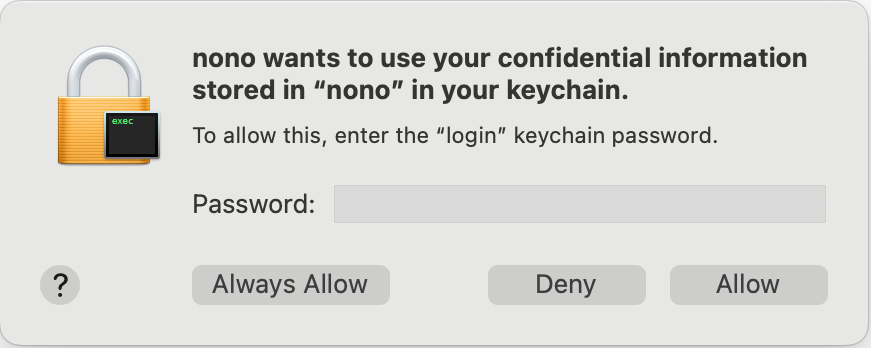
All nono secrets are stored under the service namenono in the system keystore.
macOS Keychain
- Open Keychain Access (search in Spotlight or find in
/Applications/Utilities/) - Select the login keychain in the sidebar
- Click File > New Password Item (or press
Cmd+N) - Fill in: Keychain Item Name:
nono, Account Name:openai_api_key, Password: your API key - Click Add
Linux Secret Service
Linux uses the Secret Service API, typically provided by GNOME Keyring or KWallet. You needsecret-tool (part of libsecret-tools) and a running keyring daemon.
Installation:
target default attribute is required for the keyring crate to find the entry.
Using env-credential
CLI Flag
Specify comma-separated account names to load:Profile-Based Secrets
Profiles can declare which credentials to load in theenv_credentials section:
env_credentials section maps keystore account names to environment variable names, giving you full control over naming.
Error Handling
Secret not found:Headless Linux Environments
Secret Service (GNOME Keyring) can be problematic on headless servers and SSH sessions because it requires D-Bus and a graphical login.Option 1: Use pass (Recommended for Headless)
pass uses GPG encryption and works well in headless environments.
Option 2: Environment Variables via Wrapper
For simple setups, export secrets from a protected file:Option 3: Set Up Headless Keyring
If you prefer to use Secret Service in headless mode:~/.bashrc or ~/.zshrc for SSH sessions:
Security Considerations
What nono protects:- Keystore file access - Sandbox blocks direct access to
~/Library/Keychains(macOS) and keyring files - Memory exposure - Secrets wrapped in
Zeroizing<String>and cleared after use - Environment variable filtering - Injected credentials bypass the
environment.allow_varsallow-list, so they always reach the child process even when other variables are filtered. See Environment Variable Filtering.
- Environment variable visibility - On Linux,
/proc/PID/environis readable by same-user processes. For maximum protection, use proxy injection instead. - Malicious use of credentials - nono cannot prevent a sandboxed process from misusing legitimately obtained credentials
- Use unique account names (e.g.,
myapp_openai_keyrather thanapi_key) - Rotate secrets regularly
- Only grant secrets that are actually needed
- Prefer proxy injection for LLM API keys
Next Steps
- Network Filtering - Host-level network filtering
- Profiles & Groups - Profile system overview
- CLI Reference - Complete flag documentation including network flags